One: Batman
Two: The Cat in the Hat
Three: Dorothy Gale
Four: Master Splinter
Five: Pike Bishop
Six: Kambei Shimada
Seven: Snow White
Eight: Santa Claus
Nine: Mnemosyne
Ten: Tom Brady
When you really need that 3DBB, part 3
I am really enjoying this back-and-forth with readers. 🙂
Adrian, I am totally on board with the idea of an interactive video. The fundamental question on the table, it could be argued, is whether it is better for that video to be 2D or 3D.
We have a long tradition — dating back about 125 years — of telling visual stories that get projected onto a 2D rectangle. In that medium we have the benefit of many generations of brilliant visual storytellers.
Yet the idea of the story that is told in true 3D — the kind of story that was suggested by the apparition of Princess Leia in 1977, and before that of Altaira Morbius in 1956 — is still largely theoretical. We simply have not had the hardware to realize that vision.
In 1895, with the introduction of the film projector, cinematic storytelling began its journey to become a mass medium. And now, with the imminent advent of consumer level wearables, truly immersive 3D visual storytelling is about to embark on a parallel journey.
The Steven Spielbergs, Katherine Bigelows and Guillermo del Toros of this future medium are probably still children. But one day those children will become powerful forces in the shaping of our collective cultural aesthetic.
The fruits of their creative abilities may very well be truly three dimensional, rather than a projection onto a 2D screen. Sometime soon, the image of Altaira Morbius floating in that Krell display device may become the archikí eikóna of a new cultural norm.
When you really need that 3DBB, part 2
Really great comments on yesterday’s post, thanks!
Rhema mentions the drawing room in VRChat. I totally agree that just drawing in the air together in 3D doesn’t give you the power-up you want. Our research group at NYU started doing that in Fall 2014 — some of our earliest research can be seen HERE.
What we found was that although people found it to be fun, they didn’t find it to be particularly useful or essential. Certainly not as useful or essential as a whiteboard.
Interacting with another person in VR is just not as rich as interacting with them in real life. There are so many cues of facial expression, hand gesture and body language that we use when we communicate, and such things don’t translate well into shared VR.
That’s why I think it really needs to be AR. You need to be able to see the face and hands and body of the other person, and they need to see you face and hands and body.
Also, the computer needs to be adding something more powerful than shared 3D display. What computers do well is simulate, and we would at least need to incorporate the power of simulation into our 3DBB — just as Professor Whoopee did back in the day.
I agree with Adrian that videos are very powerful, but I’m hoping for an evolution in interactive explanations. That wouldn’t be something that needed to be produce beforehand, but something that arises organically, in real time, in the course of conversation.
Yes to Möbius strips!! 🙂 🙂 🙂
When you really need that 3DBB
I was having a discussion today with some colleagues about when you really need 3D to explain something. For context, imagine you are trying to explain something using only words.
Your verbal pictures fail to get the idea across, so you go to the whiteboard. After you’ve made a few drawings, the person you are talking to suddenly has an “Aha!” moment. As the old adage goes, a picture is worth a thousand words.
But what is the equivalent power-up between the whiteboard and a hypothetical 3D holographic drawing space, floating in the air between you and the person you’re talking to? What concepts would be very difficult to explain with a whiteboard, but fairly straightforward to get across if you could just draw your thoughts in the air in 3D?
Fifty five years after the great Phineas J. Whoopee first opened up his 3DBB, I think this remains an open question. I have some thoughts about it, but I’m curious to first hear what others have to say.
A Ben Carson moment
I was fascinated to read the following news item in recent days. I’ve changed a few words here and there, but nothing essential:
Housing and Urban Development (HUD) Secretary Ben Carson has defended the removal of training materials for housing providers to prevent anti-black discrimination, arguing that the presence of black people in homeless shelters makes others feel uncomfortable.
Responding to a question by Illinois Democratic Representative Mike Quigley during a House subcommittee hearing, Carson said: “There are some white people who said they were not comfortable with being in a shelter [with] somebody who had a very different anatomy.”
Carson said: “We obviously believe in equal rights for everybody, including the black community. But we also believe in equal rights for the white people in the shelters, and their equal rights. So, we want to look at things that really provide for everybody and doesn’t impede the rights of one for the sake of the other.”
When asked by Quigley how protecting black individuals impinges the rights of others, Carson continued: “There are some white people who said they were not comfortable with the idea of being in a shelter, being in a shower, and somebody who had a very different anatomy.”
Ben Carson has a point. Black people are, in fact, anatomically different from white people. They are a different color all over their bodies!
And although Carson was too polite to say it, some white people feel sexually threatened when they are forced to share a shower with black people. Even if that feeling is based entirely on cultural myths, we still need to respect it, right?
Limerick on a Stormy evening
This evening we all got together
My friends and I, birds of a feather
To watch something super
On Anderson Cooper
We’re in for some good Stormy weather
Before the Cave, Book I (complete)
Several people have asked me for Book I of Before the Cave all in one place.
So here it is. Enjoy!
BEFORE THE CAVE (BOOK I)
VR bike
I bought a VirZOOM VR exercise bicycle for the lab — just ordered it on Amazon and it arrived two days later. You ride it like any exercise bike, but it also functions as a VR game controller.
It works just fine with Vive or Oculus or pretty much any VR system, since to your computer’s software it just looks like a game controller. Here it is, in its new place in our Future Reality Lab.
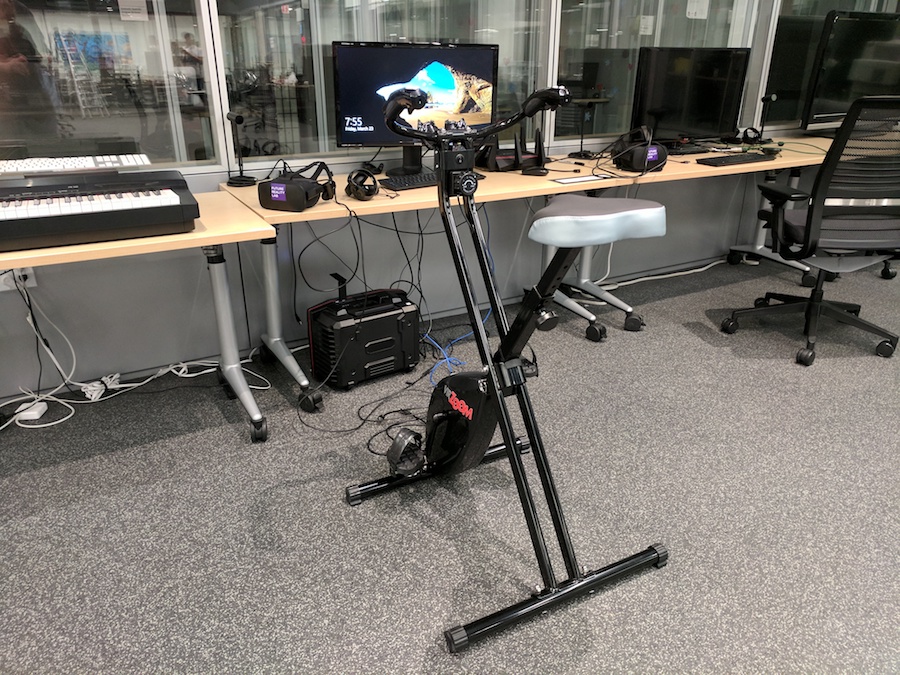
The bike was easy to set up, right out of the box. Everybody in the lab wanted a turn, and all agreed that the experience was great.
Interestingly, everyone who tried it worked up a sweat without even noticing. It’s so much fun that you don’t quite realize you are getting aerobic exercise.
Such a device raises interesting questions. It could be seen as part of a dystopian trend: one more step away from a true experience of reality, à la Ready Player One.
After all, why are you riding your bike around in a virtual world when you could be riding a bike in the real world? Isn’t this just one more step in our technologically enabled retreat from reality?
Or this device could be seen as something positive: a more healthy and body-friendly way to experience immersive entertainment. I favor the latter interpretation, for the following reason.
If movies or theater or reading books were new and unfamiliar, someone could easily argue that they are insidiously removing us from the real world. When you watch a movie or a play, or when you read a book, your true reality is being replace by a fake one.
Yet people generally don’t make that argument these days. The reason is that we now understand the cultural utility of books and theater and cinema. Through these media we do not really abandon our reality, but rather broaden it through temporary immersion in other worlds — worlds that at their best are created by great storytellers.
Imagine if you could have all those cultural benefits while getting in your 30 minutes a day of aerobic workout. To me that sounds like a pretty sweet deal.
The Edge, part 8
Let’s think about a wearable based cyber experience in which all three levels work together: the Far Edge, the Near Edge and the Cloud. But first a quick review.
Your wearable takes care of all of the sensing and display of what you see and hear. The PC that is just a short 5G wireless hop away takes care of how to make sense of that information in the short term.
Meanwhile, the Cloud is building and maintaining the long term narrative. This narrative can take many forms, and is dependent on what you are doing and why.
So here is a scenario (just one of many): Suppose you are interacting with a virtual character on your desk. Your wearable allows you to see and hear that character. Accurate sensing and low latency display lets you experience the character as though it were really there.
Meanwhile your PC is wirelessly updating the low level intelligence of the character multiple times per second. Is the character acting angry, or happy, or confused? Does it approach or avoid objects on your desk, or show interest in other virtual characters?
Behind all this, the Cloud is maintaining a consistent personality and story. Its massive processing resources manage the more semantically challenging questions of why the character is behaving as it does, and assessing what the character might choose to do an hour from now, or next week — or in response to changing world events.
From your perspective, there is only the lifelike character that feels real to you. You develop an emotional attachment to this character both because it is part of your sensory world and because it has the power to surprise you.
Intellectually, you many know that the virtual character on your desk is the product of multiple complementary cybernetic systems in communication with each other. You may even understand much of the architecture that makes this possible.
But none of that will matter if the end result is an emotionally satisfying experience. After all, if you are watching a movie and your mind drifts to wondering what lens they used to film each shot, you’re probably not having the audience experience that the filmmakers were hoping for. 🙂
The Edge, part 7
Think about the way your finger acts when you accidentally touch a burning hot skillet: It pulls away immediately, even before your brain has time to register a sensation of pain.
The part of your nervous system that makes this happen doesn’t know why it is pulling away, or even what a skillet is. Its only concern is immediate survival, and protecting your body from harm.
After you’ve had a moment to get your wits back, you most likely run your finger under cold water, fetch some ointment, put on a protective bandage. Sometime later, reflecting on this incident, you might purchase a nice pair of oven mitts.
Notice that there are three types of thinking involved here: (1) How you reflexively respond in the immediate moment, (2) What you do with conscious awareness immediately after that, and (3) The plans you make for the long term.
Yesterday we talked about the computational equivalent of the first two modes. The Cloud represents the third.
It’s really the combination of all three, working together, that will allow your future wearable to function as an experiential super-computer.
More tomorrow.