The leaves have all gone.
And naked trees, unafraid,
Huddle together.
For just a moment,
From my window, a sparrow
Upon the bare sky.
A winter morning
You, my morning sun, rises
And the world is warm.
Because the future has just started
The leaves have all gone.
And naked trees, unafraid,
Huddle together.
For just a moment,
From my window, a sparrow
Upon the bare sky.
A winter morning
You, my morning sun, rises
And the world is warm.
When you see a sci-fi movie, one of the most important tasks of the special effects designers is to convey to you, on a gut level, that some actual mechanism is at work behind the technological marvels you see. If the filmmakers are really good, this is accomplished in a completely sensory way — through visuals and sound — without the need for any supporting dialog at all. If the result is successful, you come away with a feeling that some unknown technology is causing the things you see on screen — a technology that is perfectly consistent with the world of the film and its governing logic.
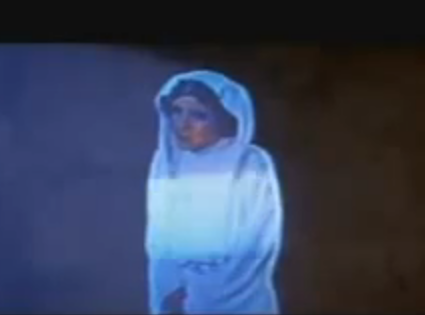
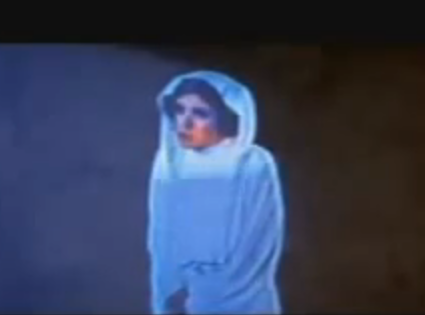
One of my favorite examples of this being done well is the work John Dykstra and his team did on conveying the idea of some sort of holographic display technology. The most famous use of this is in the scene where R2D2 projects a holographic recording of Princess Leia. The more I look at this clip, the more brilliant it seems, as an example of the art of special effects.
For one thing, there was no attempt to make it look “good”. Rather, the filmmakers realized the trick was to go the other way, by making it look like an unperfected technology. All the little glitches and missed frames tell us, on a subliminal level, that this is a “real” transmission system.
I especially like one particular artifact: A bright horizontal band keeps moving up and down the image. Subliminally, this is telling us that some sort of scanning projection technology is being used, and that this scanning process has a frame-rate that is interfering with, or “beating” against, the frame-rate used by the movie camera of the film we are watching:
Audiences don’t generally know very much about film technology, but they do know that certain kinds of motion can create interference patterns on the movie screen. We’ve all seen this effect in movies, in things like the spinning wheels of automobiles and bicycles. There probably isn’t one audience member in a hundred who could accurately describe how and why this happens, but every audience member has seen it.
Dykstra and his team used this tacit audience awareness to create a visual artifact that could plausibly have been caused by some unknown sci-fi projection technology — if that projection were being filmed by a 20th century movie camera.
Just take a moment and think how crazy brilliant that is.
How strange to discover, after having written and posted yesterday about Woody Allen’s “Annie Hall”, that yesterday was, in fact, the man’s birthday.
I suppose it’s not such a huge coincidence — after all, he has to have a birthday some time. Out of hundreds of blog posts, it’s a near certainty that I would at some point end up writing about someone on their birthday.
In fact, the odds of that not ever happening over the course of, say, four years of daily posting are only about 1 in 55 (or (364/365)(4×365), if you want to get technical).
So there you have it. Happy belated birthday Allen Konigsberg!
I rewatched “Annie Hall” periodically. I think it’s one of those protean works that holds different meaning for you, depending on where you are in life. I first saw it when I was very young, and I remember thinking of it as a powerfully romantic experience.
Last night I saw it yet again, for the first time in a number of years. What struck me this time was how different it seemed. Yes, the lines are brilliant and witty, the timing of the humor spot-on, the cultural digs pitch-perfect and devastatingly on target, the romantic scenes by the river breathtakingly lovely to the point of being iconic.
Yet at its core, something seemed fundamentally different — the story of Annie Hall and Alvy Singer wasn’t really a romance. Yes, it had all the form of a romance, but this time I realized that both of the main characters are completely self-absorbed. Both have a romantic vision of the other, but each is trapped in their own narcissistic version of reality. This may not be exactly true of the character of Annie, since we are allowed to see her only through Alvy’s eyes. But it is certainly true of him.
I had thought, upon previous viewings, that the film was a rumination on how true love can fail to work out. But now I see it as a referendum on infatuation that mistakes itself for love — the kind of relationship in which one or more partners is unwilling to do the work of climbing out of their skin long enough to truly see the other.
Sigh.
“Me and you are subject to the blues now and then
But when you take the blues and make a song
You sing them out again” -Neil Diamond
As long as we’re on the general subject of mysteriously aesthetic experiences, why do most people get such intense pleasure and satisfaction out of listening to extremely sad songs? From a purely logical perspective, it would be reasonable to think that listening to such a song would be depressing.
Yet as we all know, quite the opposite is true. I know I can listen to Leonard Cohen singing “Famous Blue Raincoat” all day long, or Billie Holiday singing “Gloomy Sunday”, or Sinatra singing “Blues in the Night”, or Jeff Buckley singing “Hallellujah”, or almost any version of “Hurt”, whether by Trent Reznor, Johnny Cash or Sad Kermit.
Why does immersion in such woe and misery make us so happy? Is it simply emotional catharsis, as Neil Diamond suggests? Or is there something else at work?
Walking past Washington Square Park this morning, I was struck by the incredibly beauty of the trees this time of year, in their autumn colors of flaming red and golden yellow.
And it occurred to me, not for the first time, to wonder why seeing something like this provokes such a powerful aesthetic response. I understand why we perceive the face of a lover or of a baby as beautiful. If we didn’t see beauty in such things, the human race would probably have died out long ago.
But why do we see beauty when looking at trees — big plants made of cellulose? Is there some evolutionary advantage to finding beauty when we gaze upon foliage? One possibility is that this response prevented our early ancestors from cutting down the forests. But that general direction of thought doesn’t explain why we find sunsets beautiful, or starry skies, or clouds, or rainbows — all things over which our ancestors had no control.
I realize that some reading this might have a handy metaphysical answer — because God made us that way. But I’m curious whether anyone has a compelling non-metaphysical answer.
Yesterday’s post got me thinking — the rise of the Web, together with the development of inverse indexing, has placed us into an information economy of abundance. Bandwidth and compression capability continue to improve, and as they do the per-unit cost of replicating an information product is gradually moving to zero.
This means that once you make something (eg: a song), the cost of physically getting it to the entire world is fairly insignificant, as a percentage of the total cost of production.
Suppose a physical economy of abundance, as suggested by the “Star Trek” replicator, really did exist. What would the world be like? Would our relationship to physical objects change fundamentally, knowing we could simply replicate them at will? Would world hunger come to an end? And would entire sets of social, cultural and economic issues arise that are currently off our collective radar?
One of the more fanciful technologies in “Star Trek” is a transporter, which converts your body into energy, beams that energy someplace else, and then reconstitutes your body at the new location. A related technology is the replicator, which can create unlimited supplies of food, firearms, vintage scotch, and other essentials for modern living.
As far as I can tell, the only thing that prevents perfect cloning — two copies of you, where both are essentially the original — is social convention. Every once in a while this sort of thing happens anyway on “Star Trek”, and it never ends well.
It occurs to me, thinking about this scenario, how we would each get along with our own perfect clone. That is, if we were to encounter exactly ourselves as another individual — same memories, same personality, same everything.
A fundamental aspect of being human is that any other individual, no matter how well you know them, remains on some level fundamentally unknowable. You can never tell what thoughts or aspects of their personality they are choosing to hide even from their nearest and dearest. But this would not be the case for your perfect clone.
So if any of us were to come face to face with our own perfect clone, there would be no secrets. I wonder whether this would come as a relief, or whether it would freak the hell out of us.
I was having a conversation today with some friends who, like me, are (1) big fans of Christopher Nolan’s early film “Memento”, not such big fans of his later larger scale work, notably “Inception”. It occurred to us that it would be great to have a backwards retrospective of selected Nolan films, starting with “Inception” and building up to “Memento”. If you’ve seen “Memento”, this makes perfect sense.
I wonder whether one could do similar meta-themed cinematic auteur surveys. A festival of Tarantino films would start in the middle of his oeuvre, and also end in the middle. A retrospective of Alain Resnais would splice together scenes taken at random from all his films. For Max Ophüls the films would need to go around in a circle, with the last film leading into the first.
A Charlie Kaufman retrospective would need to be in the form of a film about the Charlie Kaufman retrospective. For Stan Brakhage, we would get a lot of projectors and show all his films on the same screen at the same time. A Sam Peckinpah retrospective would continue until the entire audience lay dead in a pool of blood.
We would honor the career of George Lucas by screening three film masterpieces, waiting several decades, and then screening three awful films.
And of course the Jean-Luc Goddard retrospective would need to have a beginning, a middle and an end, but not necessarily in that order.
Yesterday I was waiting for a train, when a young man strolled past on the very edge of the platform, the part marked in bright yellow so people will know that walking there is dangerous.
There was an older couple standing next to me on the platform — I’d say they were both in their mid-to-late seventies. Turned to her husband, the wife said “I don’t want to see you walking on the edge like that. It’s not safe.”
Although the husband was trying to hide it, I could tell he was unhappy about being lectured by his wife. I couldn’t resist breaking in. “Some people,” I said to her, “like to live dangerously.”
They both smiled at me, and the wife said “If danger he wants, he should ride a zip line.”
Then the husband got a big grin on his face. Turning to his wife he said, “I don’t want to see you riding zip lines. It’s not safe.”